It has been 10 years since Microsoft first announced “modern SharePoint.” During that time, many enhancements have been made to the SharePoint content management experience across pages, lists, and libraries. Clients began making the early move to modern SharePoint, and it is now the default for SharePoint Online content. The whole time Microsoft has allowed tenants to create classic sites and classic content, but that is finally coming to an end. In this post, I walk through the migration options and share how the SharePoint Page Modernization Agent held up when I tested it.
Classic Page Deprecation Schedule
Microsoft has recently announced that it will completely deprecate the classic content creation experience. Here are some of the timeline details:
- March 1, 2027: Creating classic publishing sites, including site collections and subsites, and activating the classic publishing feature will be disabled for new and existing tenants (classic team sites appear to be excluded). For tenants created after this date, there will be no ability to create any more classic pages.
- October 1, 2028: All tenants will have classic pages go read-only by default on this date. There does not appear to be a timeline by which Microsoft would completely remove classic pages, however.
That is still two years away for existing tenants, but if you have not started the migration of existing classic content, you need to begin that process immediately. These timelines apply to commercial and all government-based tenants.
Options for Migration
The first step is still an assessment of the classic pages you plan to migrate. To build that assessment, use a migration tool like ShareGate or AvePoint Fly if you have one, or use the Microsoft 365 Assessment Tool, which is a rather good starting point regardless.
Once you have your inventory, you have three options to complete the migration:
- You could abandon classic sites and pages entirely, either by deleting those sites or by migrating the content manually. Moving list- and library-based content into new sites and simply rebuilding the pages is a good option, if a time-consuming one. (Regardless of which of these options you choose, there will be at least some manual rebuilding and potentially quite a bit.)
- The second option is the set of PnP scripts and cmdlets. Microsoft’s PowerShell transformation article describes the ConvertTo-PnPPage cmdlet, which converts wiki, web part, and publishing pages to modern pages and can be wrapped in a larger site modernization script. This is deterministic, which makes it more predictable. I admittedly have not tried this in a while, but my initial impressions of its output were not super positive.
- The third option is newer and, I think, the most interesting. Microsoft’s guidance points to the open-source SharePoint Page Modernization Agent for complex pages with custom HTML, script editor content, or layouts that need human judgment.1
Below is a table comparing these options.
| Option | Best for | Effort | Automation | Support status | Main risk |
|---|---|---|---|---|---|
| Manual rebuild | Key and heavily customized pages | High per page | None | Your own team | Slow, and it’s easy to run out of time if you have lots of content |
| PnP scripts | Wiki, web part, and publishing pages with standard web parts | Medium setup, then mostly unattended runs | High for standard layouts | Open-source and community-maintained | Mapping gaps and bad output on content editor content |
| Page modernization agent | Pages with custom HTML, script blocks, or layouts that need judgment | Medium, with a review step per page | Medium, with a human in the loop | Preview, with no Microsoft support SLA | Fidelity varies, the tool is newer |
In the remainder of this article, I will focus on my experience evaluating the modernization agent since it is the new option on the table. Keep in mind that no matter which of these options you choose, support from Microsoft will be minimal. The PnP scripts and modernization agent (which also lives in PnP technically) are open-source solutions, a move I believe Microsoft made to avoid supporting them at all.
Modernization Agent Results
I decided to experiment with this in Claude Code. After a quick setup (which your agent of choice can handle), you simply tell the agent which page(s) you want to convert. You can choose where the converted page lands, refine the result with follow-up prompts, and even convert a whole site at a time.
I created some classic pages for the test run. These were not complex pages by any means. I ran it a few times using a variety of classic web parts. The one catch is that recently created classic pages no longer have the content editor web part, which was the primary way a lot of site owners customized their sites (and is also what Microsoft wants to completely eliminate).
The agent reviews the page(s) and creates a JSON file for mapping into the new page. It will then convert the page(s) and place it wherever you specify over MCP. The agent also uses Playwright to review the page, and it’s given an overall score. Keep an eye on usage, because by default this agent runs several subagents to handle the planning and migration work.
Time, Cost, and Scale
My results were decent, but I was not working with anything complex. For a classic page with only three classic web parts on one run, it took over 11 minutes and cost almost $5 in API usage.2 If you scale this up to hundreds or thousands of pages, it could take forever and cost a small fortune. This is obviously not meant for a mass migration; for that, you should stick with the old PnP cmdlet. Like any agentic experience, the power comes in the ability to refine over follow-up prompts, and it does a fairly reasonable job at that.
Where It Fell Short
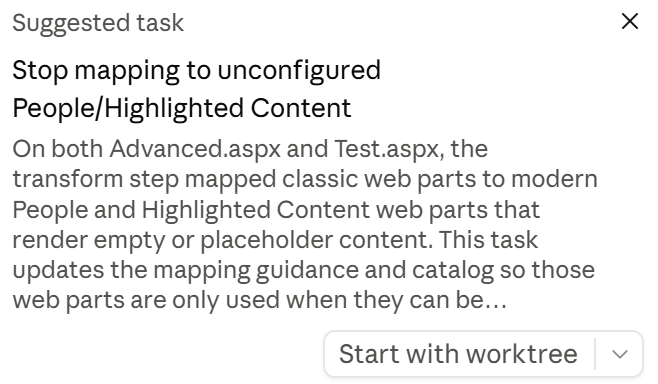
The other catches besides time and cost were the issues it could not resolve and the messages it left behind. On one run, Claude Code actually gave me a suggestion to amend the code to handle an issue I had mapping the people and highlighted content web parts. This was after a couple of attempts at these specific web part migrations.
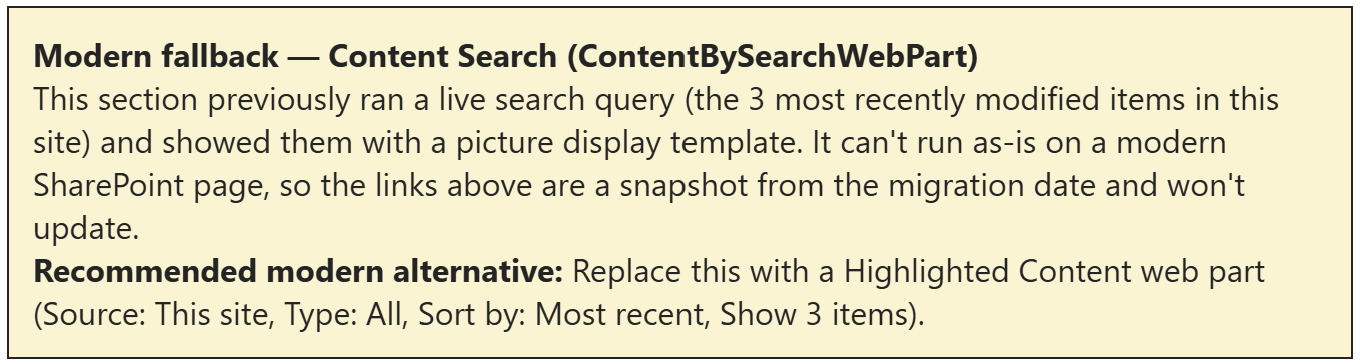
On the migrated page, in this case with a content search web part, the agent left a note saying it will not update live and that I should manually convert it to a highlighted content web part. This is obviously less than desirable.
Overall, I would say it is a very interesting concept, but I don’t think it has any place as a scalable solution. Plus, it doesn’t seem to be getting any updates in the GitHub repository.
Conclusion
Ultimately, I would classify the page modernization agent as an interesting concept but not much else. It needs far more reliability before I would be willing to suggest to a client that they invest in this approach at a more significant scale. I should add that I only tested simple pages, not the complex ones with custom HTML that Microsoft’s guidance points it toward, so your results may differ. No matter which option you choose, I would not wait much longer to decide if you have not started this effort.
This post was written with the help of AI.
- One thing that can be confusing is that this is not the SharePoint Page Agent which created SharePoint pages through Copilot. It has recently been announced that it will be removed in MC1481325. ↩︎
- An important note to this is that I chose to use Opus 5.5 to see what it could do. A less powerful model may be cheaper and faster. ↩︎
Comments (0)