I’m old enough to remember when technology consulting revolved around discrete versions of on-premises software. Each platform had different release cadences, but we would get a new version, learn it, and then have 2-3 years of stability until the next one.
However, the rise of SaaS changed that equation. We no longer get these breaks in time to acclimate ourselves to new versions. We now have to contend with understanding new features, changes, and deprecations that happen in months and weeks instead of years. This is compounded for many administrators and consultants because they’re managing multiple SaaS platforms, which makes the challenge of keeping up exponentially more difficult; you’re wading through multiple vendors, platforms, and release schedules at once.
My consulting is predominantly in the Microsoft 365 ecosystem. That ecosystem isn’t a single application; there are many applications and supporting applications to understand and keep up with. I have long struggled to keep up even when it’s my full-time job to stay abreast of all the moving parts and changes.
The Options to Keep Up
There are a lot of great folks who write on blogs and social media and curate their own content to help others keep up. Microsoft provides its own blogs as well, which are helpful; I suggest subscribing to the applications that are impactful for your work (I’m subscribed to almost a dozen). There are two other official channels geared for administrators: M365 Message Center and the M365 Roadmap.1
The Message Center is a helpful resource, but it relies on a person either reading through e-mails with paltry summaries or going to the M365 admin center to review. Neither is super convenient, but they do provide helpful information. The M365 Roadmap, on the other hand, is a resource I’m glad exists, but man do I hate using their interface. Plus, it’s almost impossible to understand how roadmap items shift in priority or expected release date (don’t even get me started on trying to understand these roadmap entries across sovereign clouds).
First Attempt: Claude Cowork and Copilot Cowork
I was relying on reading the M365 digest, sent early Monday morning each week (alongside e-mails throughout the week for one-off items). It was fine but slow, and I had to re-read the same item over multiple weeks. Also, these digest e-mails have very little detail to help you understand what’s actually happening and gauge the impact.
I wanted to try the new class of Cowork tools: Claude and Copilot Cowork. I have numerous thoughts on both of these products, but for what I needed here, both fell short. My basic thought was to build a dashboard that scraped the digest e-mail and helped me filter and browse the announcements in a more digestible format than just reading an email.
Copilot Cowork was fundamentally too fragile, and it would routinely just skip executing and not tell me about it. Claude Cowork did a better job building the dashboard using its M365 Connector, but it was still only local at that time, not cloud-based (although that has since landed in my subscription). Neither provided me what I was really striving for: a cloud-based, intelligent, and attractive dashboard that helped me filter out the noise and focus on what I needed to know.
Claude Code Routines and Artifacts
This is when I decided to stop playing around and go to Claude Code. Claude Code artifacts genuinely impress me, and I wanted to experiment more with routines, scheduled, automated workflows Claude Code runs on its own. I thought this could give me the reliable, cloud-based automation I was after.
I first built two routines: one for an M365 digest dashboard and another for a roadmap dashboard. At first I continued down the path of e-mail scraping for the M365 digest, and I used the new MCP server for the M365 roadmap (I was excited to try the recently released capability of MCP access in Claude artifacts). Eager to drop the e-mail scraping, I rearchitected the whole thing to use an Entra application that provides read access to the Message Center Graph API. It ended up being a far more reliable solution that removed the M365 Connector dependency to read e-mails.
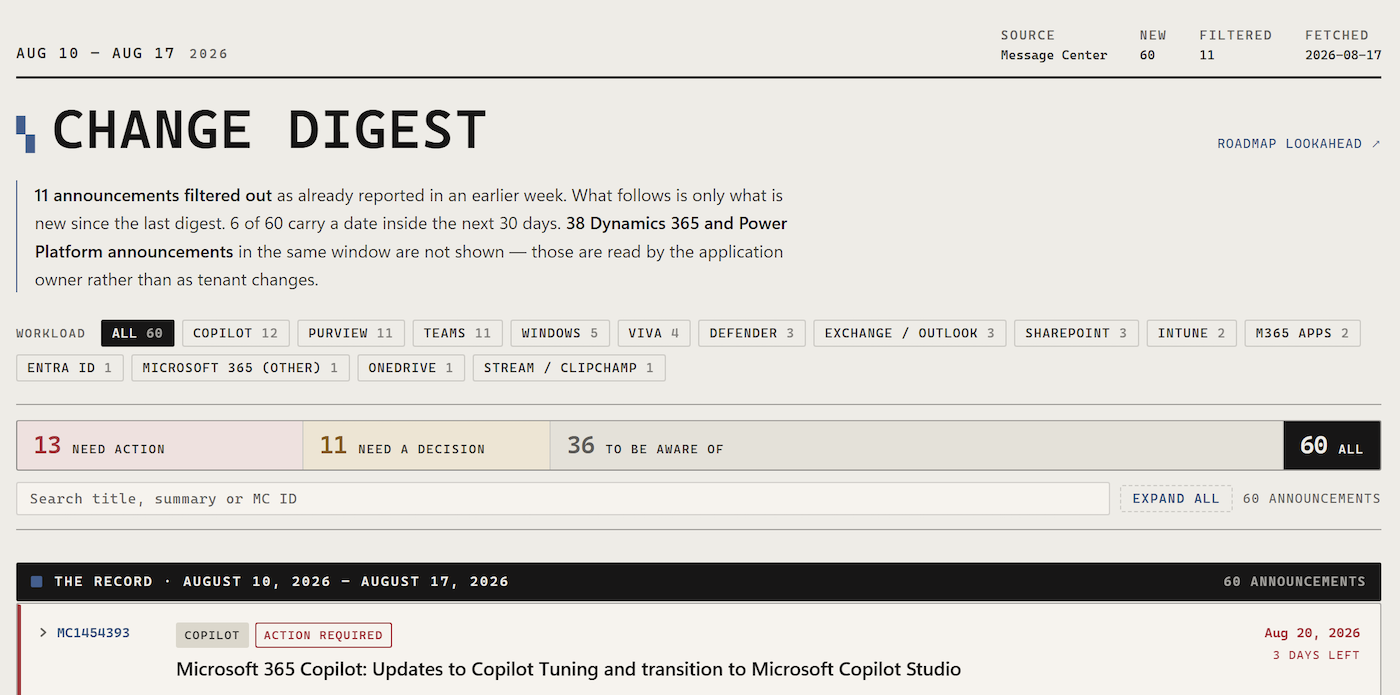
One fundamental issue I sought to solve was removing previously seen announcements so each week I only had to focus on what was new. I had Claude Code build logic to prune entries that had been shown in previous weeks, alongside all the filtering and searching one would expect from a modern dashboard (I based the dashboard UI on Digg). Lastly, it categorizes each item by whether it needs action, a decision, or just awareness, based on factors like an upcoming date or whether a configuration is required before rollout.
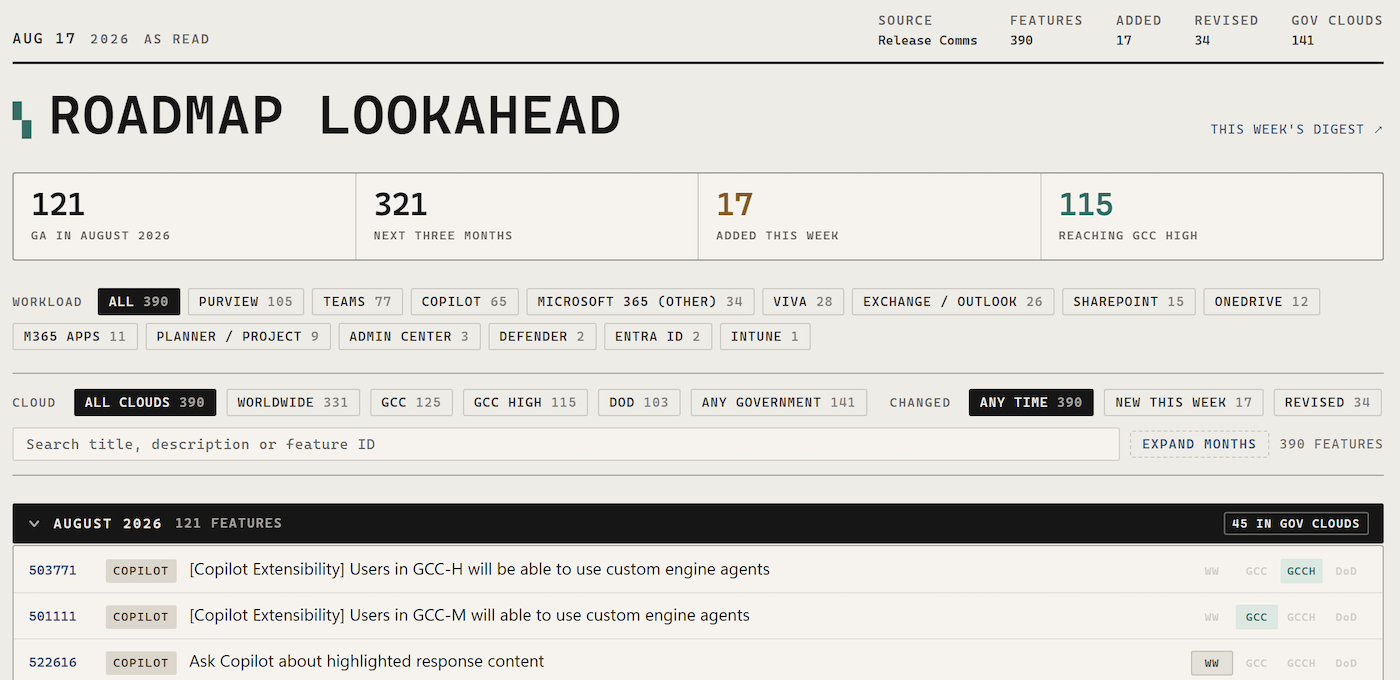
The Roadmap solution was almost perfect from the first attempt. I only ended up adding logic to the routine that would fetch more content than the MCP server returned (it was capped at a few hundred words for item summaries). This delivers a much better roadmap browsing experience than what Microsoft offers. I can particularly focus on certain clouds, like my current client work in GCC-High. What stands out is the dashboard’s ability to tell me what’s revised, what’s new, and to let me focus on the next 1-2 months of releases.
The Final Result
On Monday morning, both routines run, one using the Graph API, the other the roadmap MCP, and build their dashboards. An e-mail with links to each is then sent to me, triggered by a GitHub issue that gets created with the details (which gives me a lightweight audit trail of each week’s run).
Both dashboards support extensive filtering and searching: by workload, by priority, by keyword, or filtered down to just the action-required items. Both pages collapse to one line per item and expand to show full detail. It really makes it much easier for me to digest and understand these changes.
I’m very happy with the final products. These could be extended in many ways, for example an Azure roadmap dashboard, since that data also exists in the MCP server, but for what I want to focus on, this is more than enough. This is the kind of AI automation that makes information intake much easier and pleasant.
- I will not be calling it the “AI at Work Roadmap” from the recent rename. So stupid. ↩︎
Comments (0)