I have written about my forays into agentic development using Claude Code and what I learned using that application. I kept hearing about OpenAI’s Codex and its improvements in their models for coding, and I finally decided that it was time to evaluate it and compare to Claude Code. In this post, I want to get into the experiences I had building two separate applications in Codex. I also want to spend time at the end reflecting on the pros and cons of each coding agent and how I ended up deciding to use both for development.
I will say at the outset I know a lot has changed this week for Codex, and I will address some thoughts on that later on in the post.1
Humidor: PHP MVC App for Cigar Reviews
One thing I really enjoy is the occasional premium cigar. What I really love about cigars is the focus on quality, craftsmanship, and the wide array of experiences that you can with different blends. One of the important parts about the cigar experience is to write down and remember what I did and didn’t enjoy from each cigar blend. I’ve tried many different ways of recording these experiences, but I never found a tool that met my needs.
This led me to my very first project in Codex (outside of just using Codex for code reviews of Claude Code projects). I decided to build Humidor, which is a review log for reviews on cigars and a list of cigars I want to try. The goal was simple and well defined: logging a cigar should be fast, and the log should become a useful reference.
I started out this time more prepared than my first endeavors into Claude Code armed with an understanding of spec-driven development and how to go about the initial design stages. I decided to build a PHP MVC app because I wanted to deploy it on my server, be able to use it on my phone, and not have to worry about the overhead of maintaining a native application.
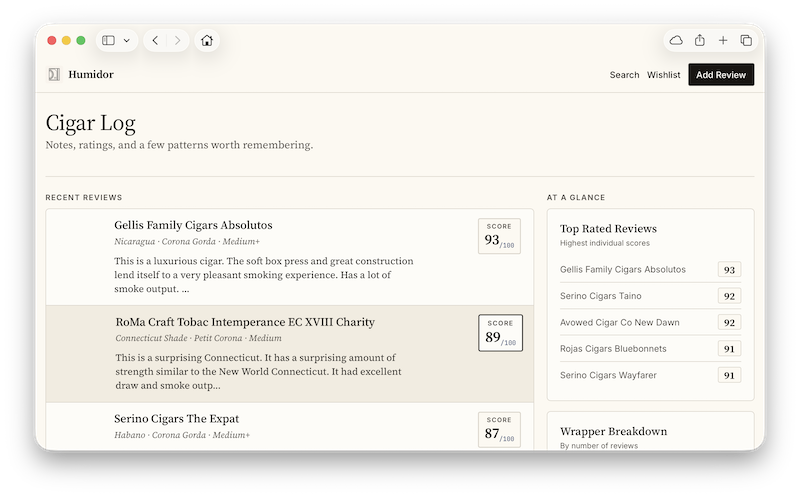
The core review workflow came first, and the visual identity followed closely behind. I shaped the interface around a paper-and-ink “review ledger” aesthetic: serif editorial typography for the review content, compact squared controls, restrained panels, and rows designed to be scanned easily. The design aspect gave me the most trouble. Codex is clearly not as good at frontend design as Claude Code even with similar frontend skills. I had to iterate on the UI for this application much longer than I would have preferred and eventually had to involve Claude Code to get it to a point where I was satisfied.
Search had to be a priority to allow for easy retrieval and filtering. I wanted a wishlist for cigars to try, designed with a compact capture, inline editing, shared form behaviors, and useful source labels generated from retailer links. I refined details throughout the app: score presentation, mobile form behavior, date handling, readable long-form notes, pagination, toasts, motion, and accessibility.
In the end I was very happy with the result, and it provides me just enough to actually use it. The only painful part was the manual migration I had to do from another site.
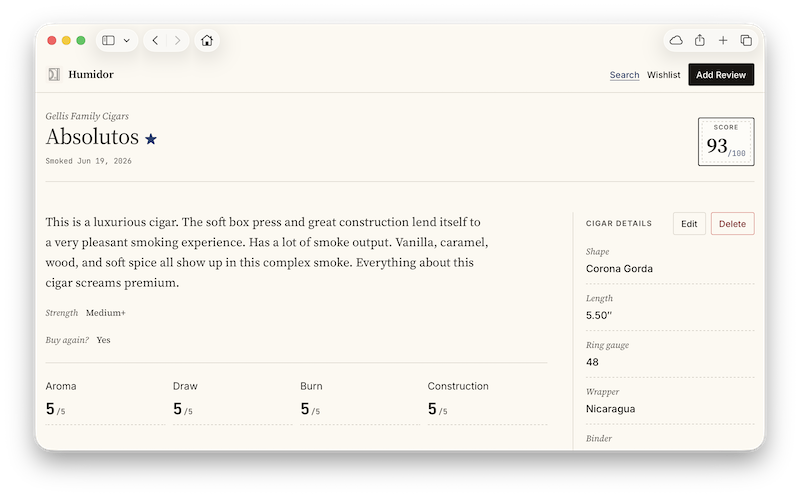
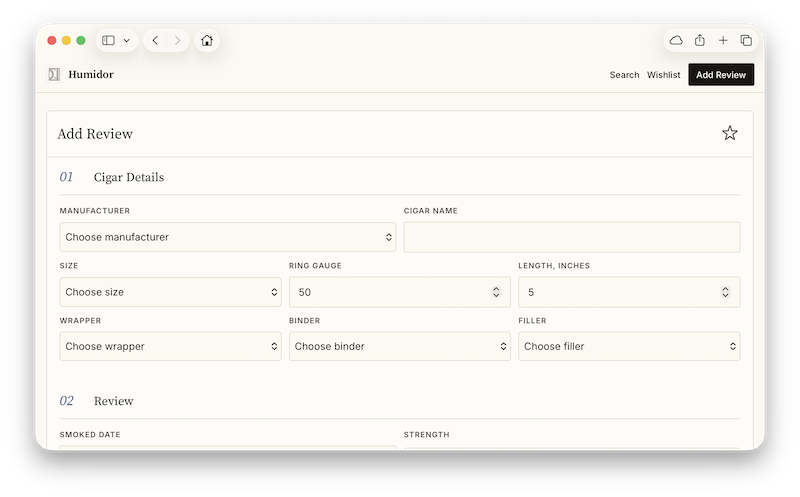
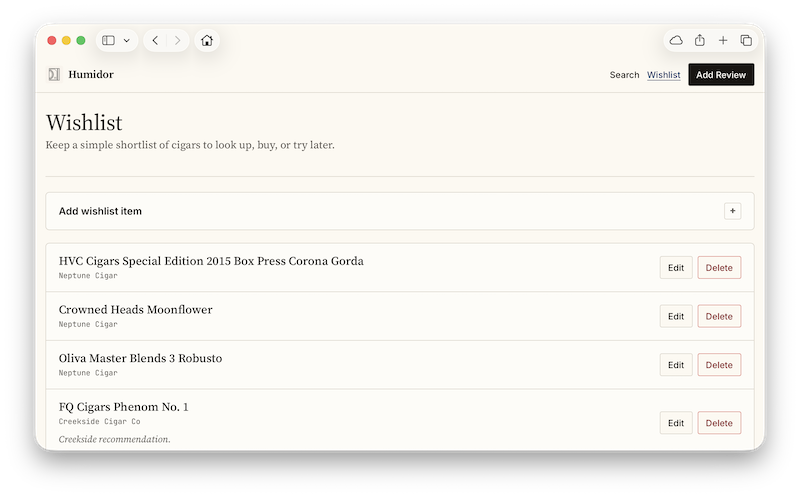
- Private cigar review log with create, edit, delete, and detail views.
- Rich review entries with the ability to capture lots of important details around each cigar for reference (wrapper, binder, filler) and a nuanced review of my impressions including an overall score.
- Dashboard with recent reviews, highest-rated entries, and a wrapper breakdown that links into filtered search.
- Full review search with free text cigar attribute selection.
- Wishlist for cigars to try, with progressive-disclosure capture, inline editing, notes, status, and source links.
- Small but thoughtful quality-of-life touches: automatic links in notes, responsive layouts, two-step inline deletion, compact status toasts, reduced-motion support, and iOS-friendly behavior.
- Humidor is a lightweight PHP and MySQL MVC web app with no additional frameworks.
- The app is organized into clear layers: pages handle requests, services apply business rules, repositories manage database queries, and views render the interface.
- The data model centers on cigar reviews, wishlist entries, and reusable tobacco details—such as wrapper, binder, and filler.
- The frontend uses plain HTML, CSS, and JavaScript, keeping it fast, understandable, and easy to maintain.
- Schema changes are tracked as SQL migrations, with a current schema snapshot retained for setup and testing.
- The app is backed by a CI process through Github Actions which run automated tests for data and code.
I have not made the code for this available, and the web app is gated behind a login. If anyone is interested in using the code, please reach out.
Duet: AI Chat Interfaces Without the Bloat
I have found that different AI chat applications, obviously with differences between models and harnesses, can produce very different responses. This obviously happens due to model strength, training, and the overall approach the company used to creating these different chat applications. The two that I use the most are ChatGPT and Claude Chat. I have found that comparing between the two of them for the exact same prompt can show illustrative things and helpful nuances that you can’t get from just looking at one of them. I was exposed to this idea with Microsoft 365 Copilot’s Researcher agent and their council feature. I really loved it and I wanted to apply something to general chat as well. I started down the road of seeing if I could build a local application on Mac that would tie into the local agentic usage for ChatGPT and Claude Code, but it turned out that there was no real way to do this specifically for ChatGPT (there was no claude -p equivalent).
On top of that desire, both OpenAI and Anthropic, specifically regarding their desktop applications for Mac, have turned into bloated applications, and that bloat largely comes from choosing the Electron architecture (not to mention cramming every feature possible into the app).2 Recently, OpenAI took their very fast and native Mac ChatGPT application and merged it with the Codex application (they renamed the old application ChatGPT Classic). The ChatGPT native Mac app also always ran behind the web interface for features such as a dedicated image generation section.
Duet was built as a focused native macOS wrapper around the web experiences I already know. Rather than attempting to recreate ChatGPT or Claude, I kept each provider’s official interface intact inside persistent WebKit views and concentrated the native app on the workflow around them: choosing a provider, switching quickly, and importantly if you want, send the same prompt to both and comparing side-by-side. I will note that once again I had to resort to a Claude product for help on the design because the first pass from Codex was so rough. I ended up using Claude Design this time with much better results (Codex was able to almost completely replicate the mockup from Claude Design). I also built a system-wide quick prompt feature to send prompts without app having to be in the foreground, and I offered a setting to persist the WebKit view state to allow for fast switching by maintaining state (at the expense of more RAM).
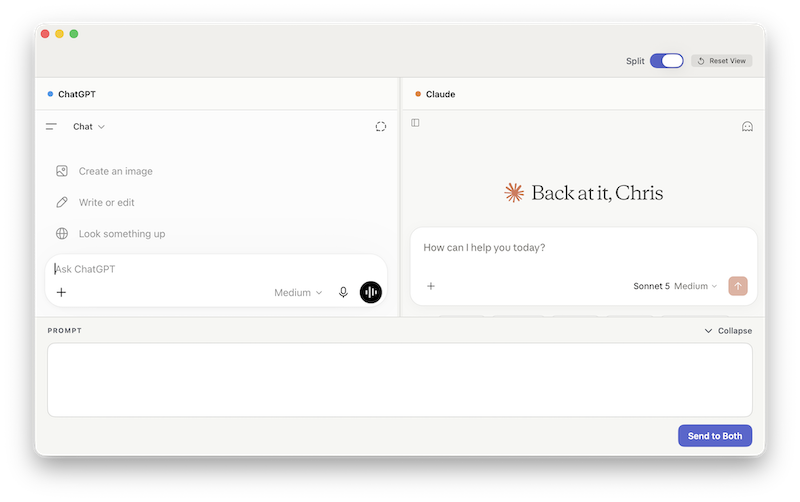
- ChatGPT and Claude in one compact native macOS application. Uses dramatically less RAM that running the official apps concurrently.
- On launch, choose between opening just ChatGPT, Claude, or open in split view.
- Fast switching between providers in single-pane mode. An optional setting allows the view to persist allowing for state persistence and faster switching.
- Optional split view with a draggable, persistent divider and a reset-to-equal-width control.
- Include a quick prompt feature invokable via a keyboard shortcut.
- A collapsible native text-only prompt drawer that has “Send to Current” and “Send to Both” actions.
- Independent website-data resets for ChatGPT and Claude.
- A native Mac app using Apple’s Swift and SwiftUI technologies.
- It displays the official ChatGPT and Claude websites inside the app, rather than trying to recreate either service.
- Each service has its own dedicated browser view, so its login session and website data can be managed independently.
- A central app layer handles the visible controls: provider switching, split view, the shared prompt drawer, and status messages.
- Provider-specific logic is kept separate, making it easier to update Duet if ChatGPT or Claude changes how its website works.
- The app sends prompts by using each provider’s existing message box and send controls, then reports whether the submission succeeded.
- Automated tests cover the key interactions, including sending prompts, sign-in detection, and moving between single and split views.
This is my first app I’ve built with agentic coding that I’ve made the app open source. Download Duet on Github: https://github.com/cpoteet/Duet.
Comparing Codex and Claude Code
I want now to reflect on these two tools after getting a chance to use them rather extensively and go through the great things they both have to offer and the rough edges that still exist. A lot can be said about the whole endeavor of vibe coding/agentic engineering, but that isn’t my purpose for this section. I just want to look at each of these tools and my thoughts on them. I will state at the outset that I’m speaking as someone who predominately uses the desktop applications not the CLI—I only use a CLI if I have no other choice.3
Speaking of the desktop applications, that is an area where both tools have come much closer together recently as I mentioned earlier. Claude has long kept Chat, Cowork, and Code in one monolithic app; but recently OpenAI, out of what appears to be Anthropic envy, has decided to merge their own harnesses together. There used to be a standalone Codex and Chat app, with the latter being a native macOS application. With OpenAI’s release of Work, they have followed suit and pushed out a bloated Electron app that is really bad. Even though the Codex app has long been an Electron app, it ran much better than Claude’s. At least OpenAI tried to make it look more Mac-native. I still think OpenAI’s aesthetic for their desktop application is better, but they have gone wayward trying to bring these harnesses together. Both of them support the same features for the most part with slight differences in approach, and both now consume an incredible amount of system resources.
Models between both are getting to the point where improvements are largely incremental.4 Again, presuming OpenAI wanted to copy Anthropic, have divided their 5.6 family of models into Sol, Terra, and Luna matching Anthropic’s Opus, Sonnet, and Haiku. I’m not mad about that because I understand Anthropic’s positioning for their models, and OpenAI’s changes makes model choice for me much simpler conceptually. Both produce great code and have great engineering features. I will say the way both models feels is still different. I find that Anthropic’s models feel more collaborative and receptive. OpenAI’s models take a more “I’ll do exactly what you say” approach and frequently dips into sycophantic responses. As I remarked earlier in the post, Anthropic’s models still do a much better job of understanding good design out-of-the-box than any OpenAI model although 5.6 has made improvements.
A quick list of comparisons:
- I struggled with Codex local permissions longer than I’d like to admit. It was so bad I almost completely gave up on it. I eventually figured it out, and then I had no issues after that. Codex definitely takes a much more conservative route to permissions than Claude Code.
- Codex handles conversation management and history so much better. I love how it automatically groups conversations by project, whereas Claude forces a single stream of them where the onus is on you to group them manually (or find out months later it actually does group by project but was hidden in the crappy UI).
- The UI in the Codex app for side chats and steering is also much better than Claude Code’s app.
- Subagents, both the intelligence on how/when to use them, and the application’s demonstration of them being used is much better in Claude Code. I can’t honestly think I can point to a specific time I noticed Codex using subagents.
- In Codex, I can actually remove a project, but for whatever reason I cannot do so in the Claude Code app. I seriously have no idea why I can’t do that in Claude Code (despite this being requested).
- The new Sites feature in Codex is pretty sweet, and I wish Anthropic would do something similar.
- I haven’t done much with scheduled tasks/routines in either app. I do know that artifacts in Claude are pretty amazing.
- I haven’t yet tried the handoff/dispatch features in either app. I have, however, used the mobile feature in the Claude iOS app that uses a cloud container with a Github repo, and that paired with a Github Action is close to magic.
- Both have a Chrome extension that works fine for application testing. I will say that general computer use feels faster and more reliable in Codex (plus I love the small preview window in the app), although Claude Code’s new in-app browser in the desktop app for testing is pretty great. I really need to try Codex’s record and replay plugin at some point.
The best way to think about these tools is as co-collaborators. When I’m creating applications whose architecture I don’t know, like macOS apps, using each to critique the other has been very valuable. Each tool’s models also take the feedback very charitably, and I think overall it leads to a much better product. Ultimately, I think choosing one or the other comes down to model nuances and whatever is most readily available to each person. I will say that I feel like my usage usually lasts longer in OpenAI’s tools, especially when they offer weekly resets fairly regularly. I find I venture into usage credits rather frequently with Claude, and those can get expensive quickly.
Conclusion
Overall, my experience using Codex was very positive and similar to using Claude Code. No matter which one you have access to, it will be a great addition to your development process. I’m having a lot of fun creating applications with technologies that would largely inaccessible to me without a lot of time spent learning new stacks, and it has made the process of developing new software fun regardless of whether building for the web or platform-specific experiences.
Portions of this post were written with the help of AI.
- If you’re interested in someone else’s take, this video breakdown is great: The unexpected death of Codex. ↩︎
- It’s baffling to me that in the age of spec-driven development and these great coding agents that Electron is still being used. In the case of Anthropic at least, the person overseeing their desktop was one of the original creators of Electron. ↩︎
- Also, I want to be clear in advance when I say “Codex” and “Claude Code,” I am often interchangeably referring to their models and applications. ↩︎
- The one exception is Anthropic’s Fable 5 model. It is absolutely amazing, but my plan can’t hold up to any kind of serious usage of the model. ↩︎
Comments (0)