Creating WordPress plugins and themes has always required significant technical knowledge. While starter themes, guidance, and documentation abound for the popular platform, it still requires significant time and effort. Beyond the technical knowledge, you still have to be able to design the necessary frontend for your theme or plugin.
Claude Code (and other AI coding agents) have changed this forever. Now anyone who is curious and willing to learn how to use these tools can create almost anything they imagine. I am a testament to this with the development and launch of Quill, but developing WordPress themes and plugins is not new territory for me. However, I have not done any of that in a long time and so much has changed, not least the advent of block themes. I still needed a tool like Claude Code to get something together in a reasonable amount of time.
The other important addition is WordPress Studio. Developing for WordPress locally used to necessitate using MAMP or WampServer, but WordPress Studio makes it self-contained and much easier to use. Equally valuable is the inclusion of several agent skills for Claude and Codex for theme and plugin development (even more posted to GitHub). WordPress Studio combined with Claude Code made developing for WordPress almost frictionless.
Developing Themes
Creating a new WordPress theme for me would be a lot of work. I would have to learn everything over again not to mention the time to design and eventually implement. I was motivated by the fact I’ve never found a free WordPress theme that either looked or acted the way I wanted or did not have a lot of upselling in it.
That frustration led me to see what I could do in Claude Code, using WordPress Studio for all of my local development. This very theme on the blog now was created end-to-end with those two tools. When I started I was very new to Claude Code, and I didn’t use the frontend design skill, Impeccable, Claude Code plan mode, or even an AI design tool like Claude Design or Google Stitch. Instead, I just asked Claude Code to give me three options (a mistake I will not repeat).
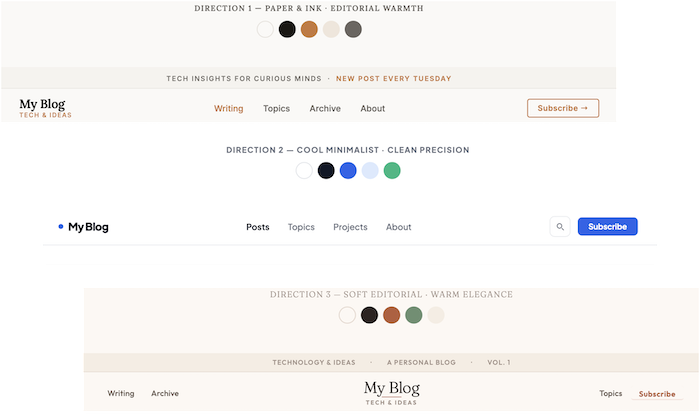
It’s evident that I chose direction 1. It looks AI-generated (because it is), but it was a close enough starting point that I decided to work from it. I worked iteratively over a few weeks refining aspects across the theme. Here is a run down of some of the things I iterated on:
- The initial theme attempt didn’t have all the block theme templates like search, categories, and 404 pages. Claude Code created them all when prompted.
- Changed the header to include a search widget and refined the search experience.
- Claude Code was able to generate me shortcodes for UI elements and manage all of their placement. Side note, I absolutely loathe editing these block templates in the WordPress admin by hand so now I don’t have to.
- Progressively adjusting the style for accents, layout, and more.
- Refining the theme across media queries. It did choose the breakpoints for me, and a point of interest in the future is Claude Code’s determination of these breakpoints.
- I ran a design critique with the frontend design skill and Impeccable and iterated on both. The most substantial critique was the Lora/Inter typography pairing, which encouraged me to go to IBM Sans for the body.
- Claude Code was able to do a full code review fixing dead code, addressing accessibility issues, and removing inconsistencies.
What impressed me most was how Claude managed the default styles WordPress dumps into the <head> of your rendered pages. I asked it to move from rendering inline and into an external stylesheet. It took a few iterations, but eventually it achieved a 96% reduction in embedded CSS with very minor touch-ups. I even asked Claude to create an approach that I could update all of this with new versions of WordPress. I have made that code available as a GitHub Gist.
One important note is that, unlike my Quill project, I have a background in frontend development, and it allowed me to work better with Claude Code. I was able to give it more specific directions, and in a couple of places I was able to debug issues that it could not. That only reinforces that knowing how to develop only improves the end result.
Developing Plugins
Creating a theme in Claude Code was impressive, but perhaps even more impressive was its plugin generation capabilities. Both plugin and theme development are informed by the pertinent WordPress agent skills included in WordPress Studio. I didn’t have to worry about best practices, structure, or even telling Claude Code where to put everything—the skills managed all of it.
The first plugin I tried to make was simply out of curiosity. I wanted to see if it could actually do something that would have taken me forever to do. I asked it to create a dashboard widget showing my most recent Raindrop saved links (I’m a recent convert to Raindrop and love it). It took all of a few minutes and had all of the plugin built including the settings page to add my API token and the working dashboard widget. That example is impressive, but it is trivial and does not impact the site.
For a more impactful example, I have had a long-running WordPress plugin that dumps all of my posts grouped by year to an archives page. It got the job done, but barely. I asked Claude Code, this time using the Impeccable skill in tandem with the WordPress plugin skill, to create for me an expanding/collapsing UI to show all of my posts grouped by category. It completed everything perfectly in the first try (including adding options to the shortcode I did not ask for). You can see that plugin in action on my archives page. I liked it so much I published it to GitHub if you want it: Category Post List.
I was able to go back to theme development and stylize the new category list plugin according to my theme styles. I had the plugin originally created with instruction to be a bit more generic to allow for theme flexibility. It handled that without an issue, and I was also able to get Claude Code to generate custom styles for other plugins like the Jetpack forms capability. These are relatively straightforward examples, but I have no doubt Claude Code could do much more complex asks.
Code Lifecycle and Memory Retention
The other thing that made using Claude Code almost frictionless was how it managed version control and server publishing. Using Git, it completely handled all aspects of publishing to GitHub: Gist creation, commits, branches, README creation, and even tags/releases. I even stopped using GitHub Desktop entirely and just offloaded all commit messaging and handling to Claude Code. I found I had to give it some preferences on how I wanted them written and remind it occasionally, but overall it was seamless.
In addition to GitHub management, Claude Code worked with me to configure SSH to publish all of my files to my Litespeed server. It intelligently knew where everything should go, and I never once had an issue or a need for an FTP client. For another Claude Code project, it configured a GitHub Action for me, and I could certainly use that again for even more expedited publishing.
The last piece that impressed me was Claude Code’s ability to write its own documentation and memories. I learned over time how to instruct it to update its own files such as the CLAUDE.md and other documentation and memories I asked it to create. When you add those plus the Git history it is a powerful tool to remember important context (but I had to learn how to effectively manage the context window to not burn through my usage).
Lowering the Barrier to Entry
I am extremely impressed with both Claude Code and WordPress Studio. The WordPress team also keeps looking for intelligent ways to use AI for site creators and the management of their platform. The best thing about all of this is how it lowers the barrier for anyone to bring their vision and preferences to life. These tools do not eliminate the need to learn development fundamentals, but they go a long way toward making the craft more accessible and enjoyable for everyone.
Comments (0)